Create a company onboarding link
There are two methods you can use to create company onboarding links.
- Run an API mutation to create a unique onboarding link for each future company account holder. Use this method for hybrid onboarding too, where you create the onboarding by API and the account holder completes it in Swan's no-code interface.
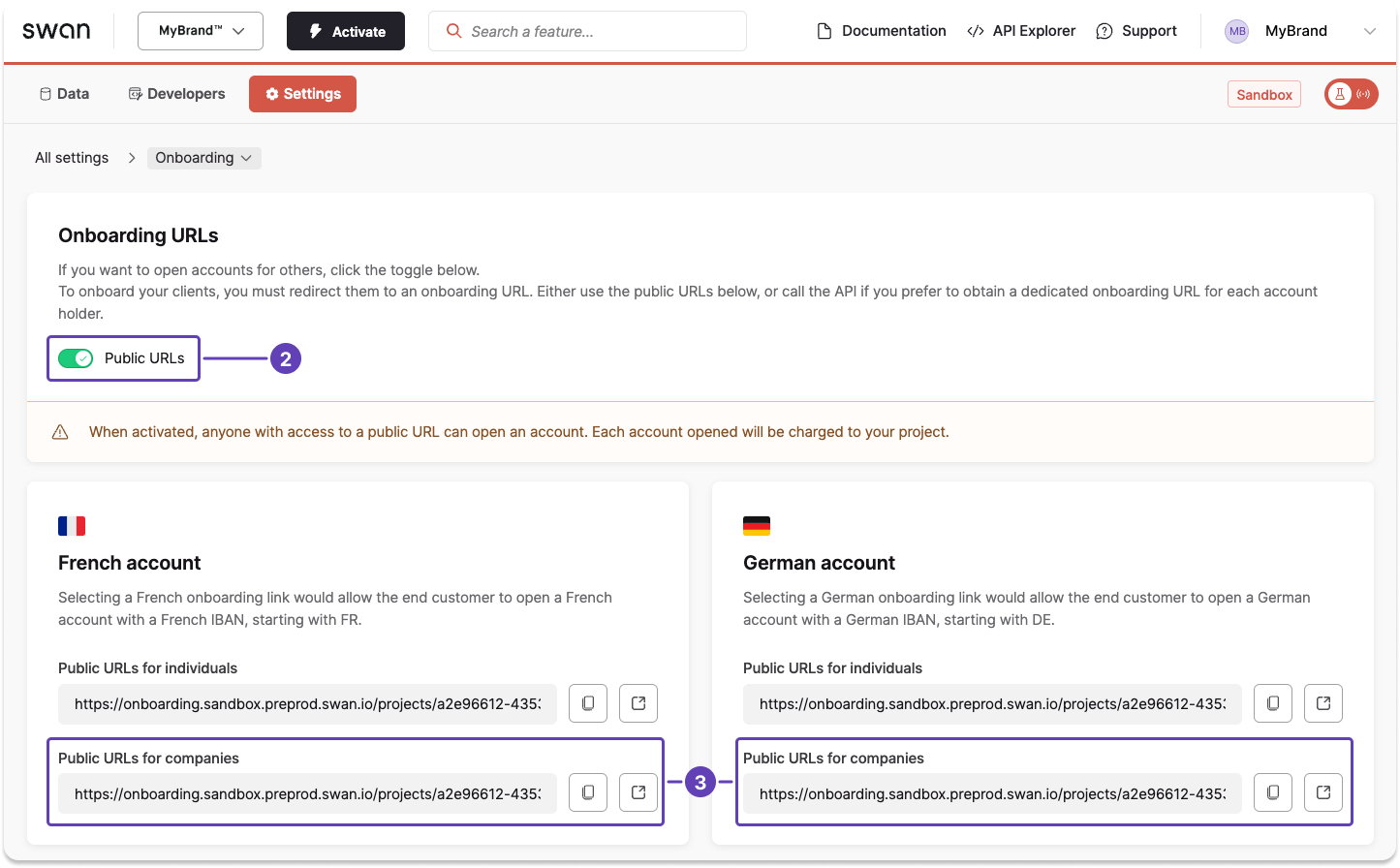
- Use a public link from your Dashboard to share one onboarding link with all of your users.
With the current onboarding API, the onboardingUrl is only returned in the create or update mutation response when the Public links toggle is enabled. If you create onboardings with the API and let your users complete them through Swan's onboarding form, enable this toggle before going live. You can find it under Settings > Onboarding in the Onboarding links section.
Use public links with caution. Those with fraudulent intent can use these public links to complete multiple onboardings, and if this happens undetected, they'll have multiple accounts in your project.
Unique links using the API
Create a unique company onboarding link for each user with the API.
- Call the
createCompanyAccountHolderOnboardingmutation. - Enter information for all required API fields for the account country, as noted in country requirements for company accounts.
- Start with
accountInfo(account country and optional name). - Add
accountAdmindetails (email, language, type of representation). - Add the
companyobject with business details andrelatedIndividuals.
- Start with
- Include optional fields as needed for your use case (such as
accountInfo.nameoroAuthRedirectParameters). - Add optional messages to the success payload, either for validation or in case of rejection.
The previous onboardCompanyAccountHolder mutation is deprecated.
Deprecated mutations will be removed at the end of September 2026.
Use createCompanyAccountHolderOnboarding for all new integrations.
For companies in France, use the companyInfoRegistryData query with the company's registration number to retrieve data from the National Business Register (RNE). Pass the results to the mutation to pre-fill company fields.
Mutation
Open in API Explorermutation CreateCompanyOnboarding {
createCompanyAccountHolderOnboarding(
input: {
accountInfo: {
country: ESP
}
accountAdmin: {
email: "alberto.moreno@mimarca.io"
preferredLanguage: es
typeOfRepresentation: LegalRepresentative
}
company: {
name: "MiMarca"
businessActivity: Construction
businessActivityDescription: "Historical restoration"
registrationNumber: "123456789"
legalFormCode: "DP3Q"
monthlyPaymentVolume: Between10000And50000
regulatoryClassification: NonFinancialActive
address: {
addressLine1: "21 Barrio de San Roque"
city: "Barcelona"
country: "ESP"
postalCode: "08005"
}
taxIdentificationNumber: "Y1234567Z"
relatedIndividuals: {
type: LegalRepresentativeAndUltimateBeneficialOwner
firstName: "Sofia"
lastName: "Ramos"
sex: Female
birthInfo: {
birthDate: "1990-03-03"
country: "ESP"
city: "Madrid"
postalCode: "28004"
}
address: {
addressLine1: "1 Camino del Oceano"
city: "Barcelona"
country: "ESP"
postalCode: "08005"
}
nationality: "ESP"
unitedStatesTaxInfo: {
isUnitedStatesPerson: false
}
legalRepresentative: {
roles: "Administradora única"
}
ultimateBeneficialOwner: {
qualificationType: Ownership
ownership: {
type: Direct
totalPercentage: 100
}
}
}
}
}
) {
... on CreateCompanyAccountHolderOnboardingSuccessPayload {
__typename
onboarding {
id
statusInfo {
status
... on OnboardingInvalidStatusInfo {
errors {
field
errors
}
}
}
}
}
}
}
Payload
The success payload returns the onboarding id and current status.
The OnboardingInvalidStatusInfo fragment included in the example lists everything still needed to finalize the onboarding.
Some countries also require supporting documents, such as the sworn statement and Ultimate Beneficial Owner declaration for Spain.
Documents can't be provided with this mutation, so the onboarding status stays Invalid until they're collected—either from the end user during the onboarding flow, or uploaded with the API.
All other requirements for the example are complete, so only the missing documents are listed.
{
  "data": {
    "createCompanyAccountHolderOnboarding": {
      "__typename": "CreateCompanyAccountHolderOnboardingSuccessPayload",
      "onboarding": {
        "id": "eda0ceec-0e20-4d1b-bbee-b3e3a4227c99",
        "statusInfo": {
          "status": "Invalid",
          "errors": [
            {
              "field": "supportingDocumentCollection.UBODeclaration",
              "errors": ["Missing"]
            },
            {
              "field": "supportingDocumentCollection.SwornStatement",
              "errors": ["Missing"]
            }
          ]
        }
      }
    }
  }
}
Public link using the Dashboard
- On your Swan Dashboard, go to Settings > Onboarding.
- In the Onboarding links section, toggle Public links to on.
- Notice the links that appear for individuals and companies for each account country.